
DOC – What is a Ping Back
Pingback Notifications
When a post or page is saved which references another URL (both internal and external to the TechForSeniors environment), a ping is sent to any posts/pages linked to the saved post and an email alert is automatically sent to the site administrator. During periods of higher activity (such as system test and maintenance), many pingbacks can be generated. Although this doesn’t necessarily hurt anything it can become a nuisance, but these pingbacks can actually help identify mis-linked posts/pages. These pingbacks are collected on the WP admin panel under the Comments section and really should be carefully reviewed before approving them.
We have taken the approach that we will leave on notifications involving external links; Posts collected in Links for Seniors Links are posts that reference external locations and some of our training material may also do that. Leaving external pingbacks active is really a safeguard to notify us when a page or post contains an exit from the TechForSeniors environment or when an external page contains a link into our environment.
There is an option to turn off notifications when a changed post/page contains a reference to an internal post/page. This occurs on nearly all the “links” posts and on many of the training posts. The following code in the functions.php file implements filtering out internal pingbacks (this code is currently commented out and inactive).
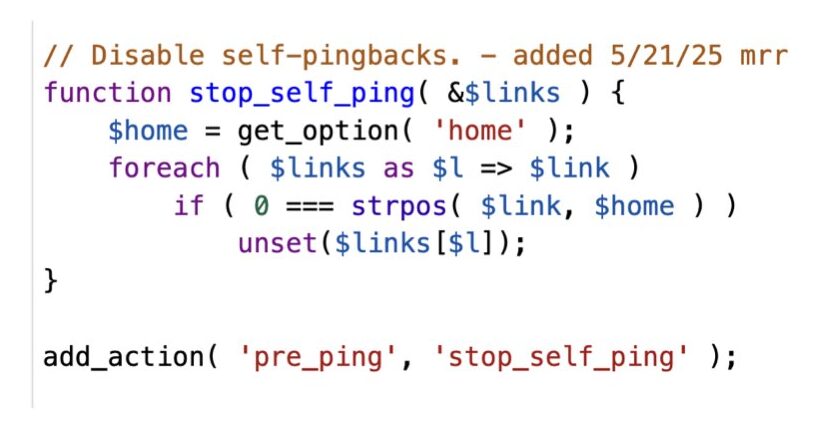
This checks for links on a page/post when it is saved. If the link starts with the home address, it will filter out those pingbacks. NOTE – this code is currently commented out and inactive.